


How to Use QR Payment Laos with Bitget Wallet?
How to Use QR Payment Laos starts with understanding that Bitget Wallet allows users to scan supported Lao QR codes, pay with USDT or USDC from their wallet, and complete a familiar payment flow while merchants receive local currency through the existing system. The experience feels like a standard scan-and-pay process, but the backend connects Laos’ QR payment infrastructure with stablecoins and on-chain settlement.
QR payments are becoming an important part of everyday transactions in Laos as Lao QR serves as the country’s unified QR payment standard across banks and payment apps. As users look for practical ways to spend digital assets in real-world situations, Bitget Wallet helps bridge crypto and daily payments through direct Lao QR payment support.
In this article, we’ll explain how to use QR Payment Laos with Bitget Wallet, how it works, and what to check before you pay.
Key Takeaways
- How to Use QR Payment Laos is simple with Bitget Wallet: scan Lao QR, pay with USDT/USDC, and complete transactions in a familiar flow.
- QR Payment Laos enables fast scan-and-pay transactions across local merchants, making it increasingly practical for everyday use.
- Bitget Wallet supports Lao QR with Bitget Wallet, allowing users to spend stablecoins while merchants receive local currency seamlessly.
Overview of QR Payment Laos
QR Payment Laos is built around Lao QR, the unified QR payment standard used across banks and payment providers in Laos. Because Lao QR enables interoperable QR payments between different financial apps, it creates a consistent and simple payment experience that users can rely on across multiple everyday scenarios.
Core logic:
- Users scan a Lao QR code: The customer scans a supported Lao QR code using a banking app or compatible wallet.
- Merchants receive local currency: The merchant receives payment in local currency through the existing financial system.
- Bridge between traditional payments and crypto-enabled payments: The experience feels like local QR banking, while wallets like Bitget Wallet can connect this flow with crypto QR payment Laos using stablecoins.
Source: commons.wikimedia.org
How does it work?
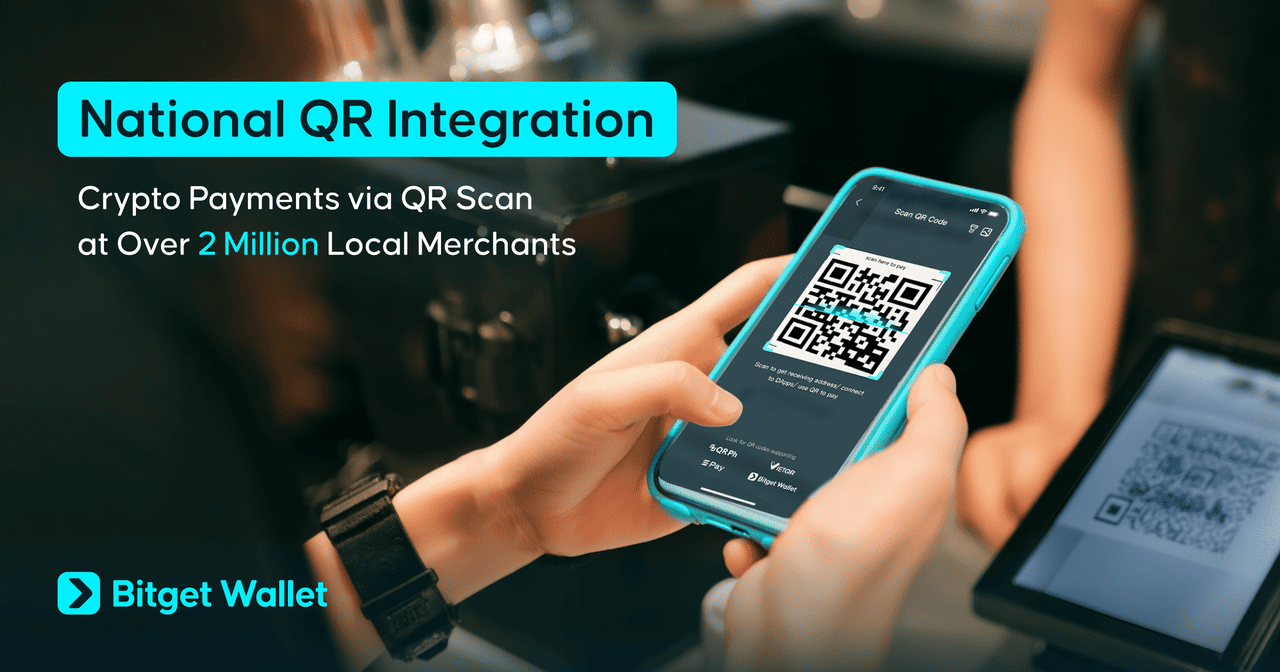
QR Payment Laos works through a simple payment flow that mirrors local QR payment behavior while enabling wallet-based payments.
- Step 1: Merchant displays a Lao QR code A merchant shows a Lao QR code linked to their payment details, either static or dynamic depending on the setup.
- Step 2: User scans using a supported wallet or app The user opens a supported wallet such as Bitget Wallet and scans the QR code.
- Step 3: User confirms the payment amount The payment details, including amount and recipient, are displayed for confirmation.
- Step 4: Supported digital assets are used in the payment flow In a wallet-supported model, users can pay using USDT or USDC, instead of relying on local bank balances.
- Step 5: Merchant receives local currency through settlement The merchant receives funds through the local system, keeping the payment experience consistent with existing practices.
The experience feels like a local QR payment flow in Laos, but the backend can integrate stablecoins and wallet-based payment tools without changing how merchants receive funds.
Where to Use QR Payment Laos?
QR Payment Laos is increasingly used across everyday scenarios where Lao QR payment is accepted. It is commonly seen in local retail environments, small businesses, and service-based transactions, making it practical for both residents and visitors.
You can use QR Payment Laos in:
- local retail stores and convenience shops
- restaurants and cafés
- tourism and travel-related spending
- small merchants and informal sellers
- person-to-person collection scenarios
- selected QR-enabled business payment environments
As Laos continues to expand its National QR ecosystem and strengthen regional payment connections, QR-based payments are becoming more integrated into daily financial behavior. This makes QR Payment Laos not just a local payment tool, but part of a broader shift toward interoperable and crypto-connected payment experiences.
How to Use QR Payment Laos with Bitget Wallet?
How to Use QR Payment Laos with Bitget Wallet is simple once your wallet is ready. The process follows a familiar scan-and-pay flow: scan the Lao QR, review the details, and confirm in just a few steps. Before paying, make sure you have USDT or USDC and enough native tokens for gas fees.
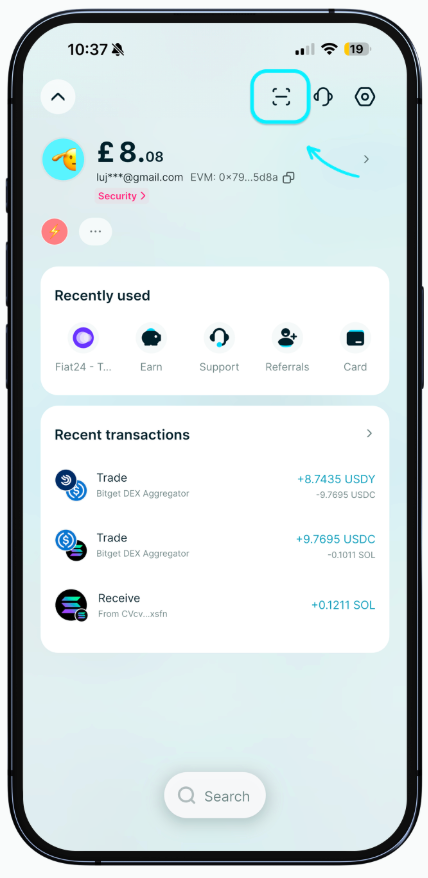
Step 1: Open the scan feature
- Go to Home: open Bitget Wallet and access the main dashboard.
- Tap the Scan icon: select the scan feature to start a QR payment.
- Choose the supported national QR payment flow: this is where the Lao QR payment flow begins.
This step opens the interface used to scan Lao QR codes directly inside the app, making QR Payment Laos feel similar to local mobile banking apps.
Step 2: Prepare your wallet balance
Deposit USDT or USDC into your wallet before making a payment to ensure a smooth transaction.
- Base: fund your wallet with supported stablecoins on Base.
- BNB Chain: deposit USDT/USDC for efficient and low-cost transactions.
- Ethereum: ensure your ERC-20 stablecoin balance is available.
- Solana: prepare stablecoins for faster and lower-fee payments.
- Tron: deposit USDT/USDC if using the Tron network.
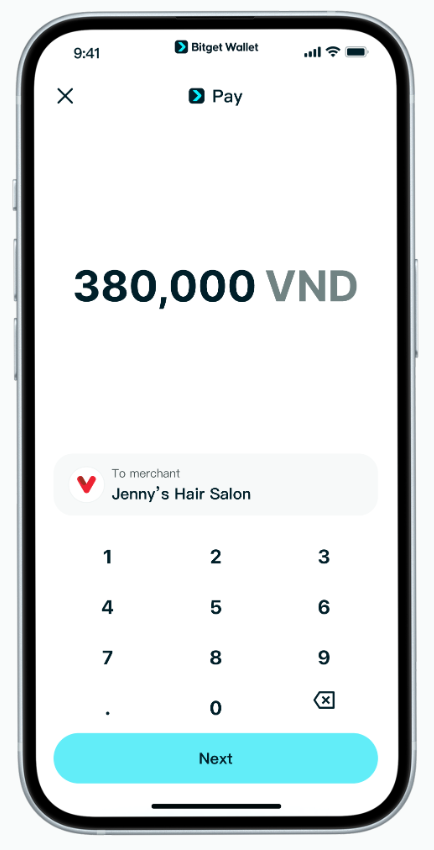
Your funds will be deducted directly from your stablecoin balance, and the system handles automatic conversion and settlement during the Bitget Wallet Laos payment flow.
Step 3: Add native coins for gas fees
You also need native tokens to cover gas fees because QR Payment Laos uses on-chain transactions.
- BNB Chain: requires BNB
- Ethereum: requires ETH
- Solana: requires SOL
- Tron: requires TRX
BNB Chain and Solana usually offer lower fees, making them more practical for frequent payments. Ethereum and Tron may have higher fees depending on network conditions, so always check before confirming.
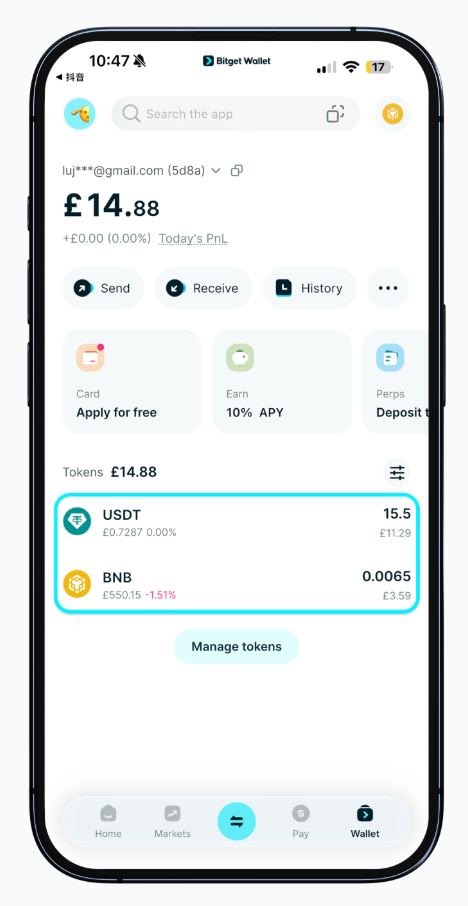
Step 4: Scan the Lao QR code and review payment details
- Scan the merchant’s Lao QR: use the in-app scanner to capture the QR code.
- Verify the amount: confirm that the payment amount is correct.
- Check the selected token: ensure the correct stablecoin and network are used.
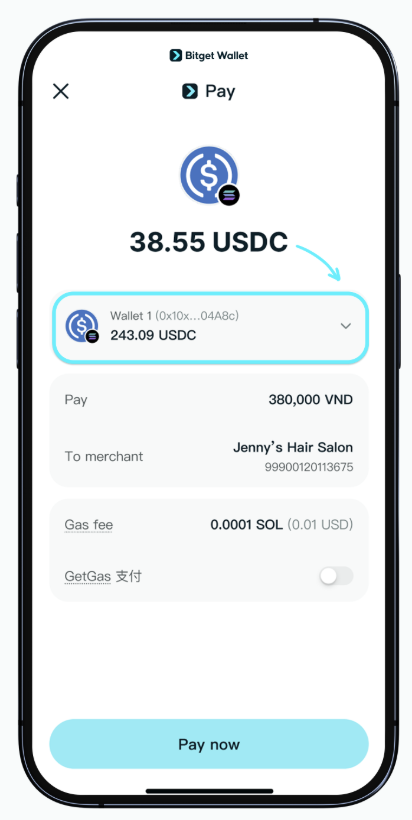
The system may automatically select the token with the highest available balance, but users can switch tokens if needed. Always double-check details before proceeding with how to use QR Payment Laos safely.
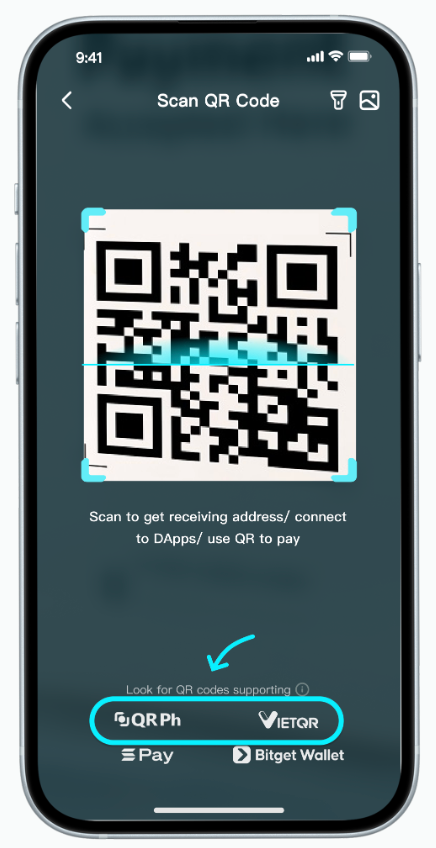
Step 5: Confirm and complete the payment
- Amount: review the payment total.
- Token: confirm which stablecoin is used.
- Gas fee: check the network fee before approving.
- Check transaction limits: make sure your payment is within the supported limits:
- 500 USD per transaction
- 1,500 USD daily limit
- 10,000 USD monthly limit
- Tap Confirm: approve the transaction to complete the payment.
After confirmation, Bitget Wallet processes the payment so the merchant receives local fiat currency, while the user pays with supported stablecoins such as USDT/USDC. In most cases, payment confirmation is returned quickly.
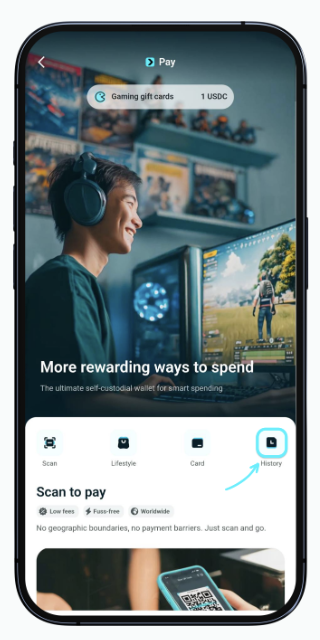
Step 6: Check your payment history
Go to Pay → History to review your transaction records.
- Track completed payments
- Verify transaction status
- Review past Lao QR payment activity
This feature helps users confirm whether their QR Payment Laos transaction was successful and keeps a clear record of all activity.
These steps make QR Payment Laos as easy as using a local Lao QR payment app, while still allowing users to spend digital assets seamlessly through Bitget Wallet.
What to do Before Using QR Payment Laos?
Before you jump into using QR Payment Laos, it’s worth getting a handle on how the payment flow actually works. A little prep goes a long way—fewer screw-ups, and a much smoother experience with Bitget Wallet. Since these payments mix Lao QR infrastructure with on-chain transactions, you’ll want to check a few things beforehand: supported tokens, networks, gas fees, and transaction limits.
- Supported assets and networks: USDT and USDC are supported, with payments available on Base, BNB Chain, Ethereum, Solana, and Tron. Make sure your wallet is funded on a supported network before using QR Payment Laos.
- Gas fee considerations: QR Payment Laos transactions are processed on-chain, so you must hold enough native tokens (such as BNB, ETH, SOL, or TRX) to cover gas fees before confirming.
- Lower-fee networks: BNB Chain and Solana are often more cost-efficient for everyday payments, while Ethereum and Tron may have higher gas costs depending on network conditions.
- Transaction limits: For QR Payment Laos, the standard limits are 500 USD per transaction and 5,000 USD per day, with no monthly cap. Always stay within these limits to avoid failed transactions.
- Payment confirmation: Always verify the payment amount, merchant details, and selected token before confirming. The system may automatically choose a token based on your wallet balance.
- Payment speed: Most QR Payment Laos transactions complete within seconds. If there is a delay, you should check your transaction history or contact support.
- Practical reminder: Always double-check the QR code, payment amount, selected token, network, gas fee, and available balance before submitting any transaction.
Bitget Wallet: The Best Place to Use QR Payment Laos
How to Use QR Payment Laos gets way more practical with Bitget Wallet. It packs self-custody, stablecoin spending, and direct support for the National QR system into one smooth payment flow. No need to mess with local banking apps anymore—just scan a Lao QR code, pay with your digital assets, and you're done. The whole thing feels just like the scan-and-pay you're already used to.
How does Bitget Wallet make QR payments more practical for everyday use?
QR payments are already everywhere in Laos thanks to Lao QR. The real trick is making crypto spending feel just as natural. Bitget Wallet nails that by letting you use stablecoins directly, with an experience that's basically the same as any local QR payment app.
- Lao QR support: Users can scan supported Lao QR codes directly in the app, making QR Payment Laos consistent with local payment behavior.
- Stablecoin utility: Users can pay using USDT or USDC across multiple networks, turning digital assets into practical spending tools.
- Local settlement experience: While users pay with crypto, the payment is completed in local currency on the merchant side, ensuring a smooth checkout.
- All-in-one wallet flow: Payment, storage, and asset management are integrated into one interface, reducing friction.
- Cross-chain flexibility: Users can choose assets from different supported networks based on balance and gas efficiency.
- Familiar UX: The scan-and-pay process closely matches how QR payments already work in Laos.
With Bitget Wallet, QR payment Laos feels less like a crypto experiment and more like a practical way to use digital assets in everyday life.
Conclusion
How to Use QR Payment Laos with Bitget Wallet—honestly, once you’ve got your wallet set up, it’s a breeze. You just need some stablecoins like USDT or USDC, a tiny bit of native tokens for gas fees, and access to a Lao QR code. From there, it’s super straightforward: open the scan feature, point it at the QR code, double-check the payment details, hit confirm, and you’re done in seconds.
As Laos keeps growing its QR payment scene with Lao QR, Bitget Wallet makes life easier for crypto users by letting you connect digital assets directly to real-world spending. No more letting your crypto just sit there—you can actually use it for everyday stuff.
Download Bitget Wallet now to explore a simpler way to use digital assets for everyday QR Payment Laos.
Sign up Bitget Wallet now - grab your $2 bonus!
FAQs
1. How to Use QR Payment Laos with Bitget Wallet?
Just open the scan feature, load up your wallet with USDT or USDC, make sure you’ve got enough gas fees, scan the Lao QR code, review the details, and confirm the payment.
2. Can I use USDT or USDC for QR Payment Laos?
Yes. Through Bitget Wallet, QR Payment Laos works with stablecoins like USDT and USDC on supported blockchain networks.
3. Do I need gas fees to use QR Payment Laos?
Yes. Since these transactions happen on-chain, you’ll need a small amount of native tokens to cover the gas fees.
4. Is QR Payment Laos mainly based on Lao QR?
Exactly. QR Payment Laos is built around Lao QR, which is the unified QR payment standard used across Laos.
5. Does Bitget Wallet support Lao QR payment?
Yes. Bitget Wallet supports Lao QR payments through its National QR feature, so you can scan and pay directly inside the app.
Risk Disclosure
Please be aware that cryptocurrency trading involves high market risk. Bitget Wallet is not responsible for any trading losses incurred. Always perform your own research and trade responsibly.
 How to Use QR Payment Thailand with Bitget Wallet?2026-04-13 | 5 mins



