


How to Use QR Payment Thailand with Bitget Wallet?
How to Use QR Payment Thailand starts with understanding that Bitget Wallet lets users scan supported Thai QR codes, pay with USDT or USDC from their wallet, and complete a familiar payment flow while merchants receive Thai baht (THB) through the existing payment system. The experience feels similar to local scan-and-pay apps, but the backend connects Thailand’s QR payment infrastructure with stablecoins and digital asset settlement.
QR payments are already a core part of everyday payments in Thailand because Thai QR Payment and the broader PromptPay ecosystem have made QR-based transfers and merchant payments widely used across daily spending scenarios. Bank of Thailand presents PromptPay as core payment infrastructure and links it directly with Thai QR Payment, showing how important QR-based payments have become in the local market. As more users look for practical ways to spend digital assets in real-world settings, Bitget Wallet helps connect crypto with everyday payments through direct in-app Thai QR support.
In this article, we’ll explain how QR payments work in Thailand, how to use them with Bitget Wallet, and what to check before you pay.
Keys Takeaways
- How to Use QR Payment Thailand is simple with Bitget Wallet: scan Thai QR, pay with USDT/USDC, and complete transactions in a familiar flow.
- QR payment Thailand is closely tied to Thai QR Payment and PromptPay, making Thailand one of the strongest markets for everyday QR-based payments.
- Bitget Wallet supports Thai QR scanning directly, letting users spend stablecoins while merchants receive THB through local payment settlement.
Overview of QR Payment Thailand
QR payment Thailand is built around Thai QR Payment and the broader PromptPay payment ecosystem. Bank of Thailand describes Thai QR Payment as a payment service that allows users to pay more conveniently by scanning a QR code through a mobile banking application, and it highlights this service as part of the country’s move toward a less-cash society. Because QR payments are deeply integrated into Thailand’s retail and digital payment environment, Thailand has become one of the strongest markets for wallet-based QR payment experiences tied to everyday local payment behavior.
Core logic:
- Users scan a Thai QR code: The customer scans a supported Thai QR code using a banking app or compatible wallet.
- Merchants receive THB: The merchant receives Thai baht (THB) through local payment settlement.
- Bridge between traditional payments and crypto-enabled payments: The experience feels like local QR banking, while supported wallets like Bitget Wallet can connect this flow with digital assets.
Source: figma.com
How does it work?
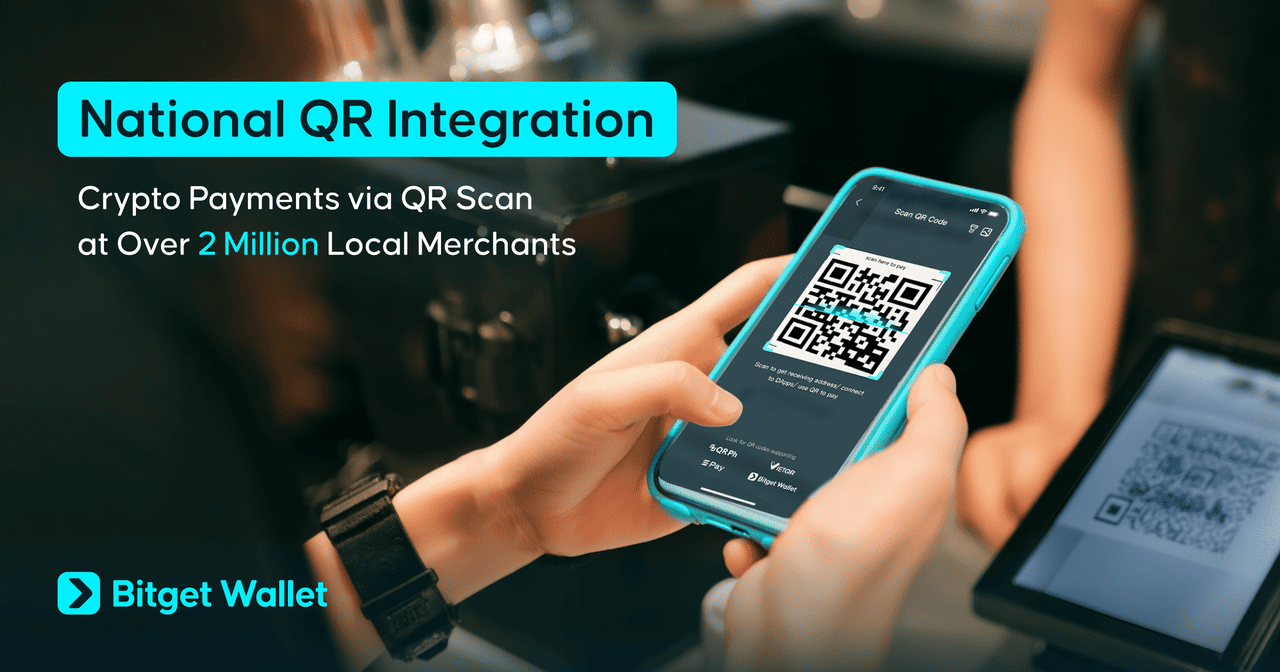
QR payment Thailand works through a simple payment flow that feels familiar to local users while running on top of Thailand’s established QR payment environment.
- Step 1: Merchant displays a Thai QR code A merchant shows a Thai QR code linked to payment details at checkout.
- Step 2: User scans using a supported app or wallet The customer opens the scan feature in a supported banking app or wallet and scans the code.
- Step 3: User confirms the payment amount The user reviews the amount and payment information before proceeding.
- Step 4: Supported digital assets can be used in the payment flow In a wallet-supported model such as Bitget Wallet, USDT or USDC can be used to complete the transaction.
- Step 5: Merchant receives local currency through settlement The merchant receives THB through the existing payment flow, so the payment remains compatible with everyday merchant behavior in Thailand.
The experience feels like a local QR payment flow in Thailand, but in supported cases the backend can integrate stablecoins and wallet-based payment tools without changing how the merchant gets paid.
Where to Use QR Payment Thailand?
That question matters because QR payment Thailand is already deeply embedded in daily life. Thai QR and PromptPay-style payments are relevant across local retail stores, restaurants, cafés, convenience stores, small merchants, and tourism-related payment scenarios. Bank of Thailand also highlights cross-border QR payment linkages built on Thailand’s QR success, showing that the country’s QR ecosystem is not limited to domestic use alone.
You can think of QR payment Thailand as part of a broader payment habit rather than a niche feature. In practice, that makes Thai QR relevant not only for standard merchant checkout, but also for small businesses, daily spending, and selected cross-border retail payment scenarios connected to Thailand’s expanding QR ecosystem.
How to Use QR Payment Thailand with Bitget Wallet?
How to Use QR Payment Thailand with Bitget Wallet is simple once your wallet is funded and ready. The process feels familiar: scan, confirm, and pay in just a few steps. Before starting, make sure your wallet is set up, your USDT or USDC balance is available, and you hold enough native coins for gas fees. Bitget Wallet supports Thai QR scanning in Thailand, allowing users to pay with stablecoins while merchants receive local currency.
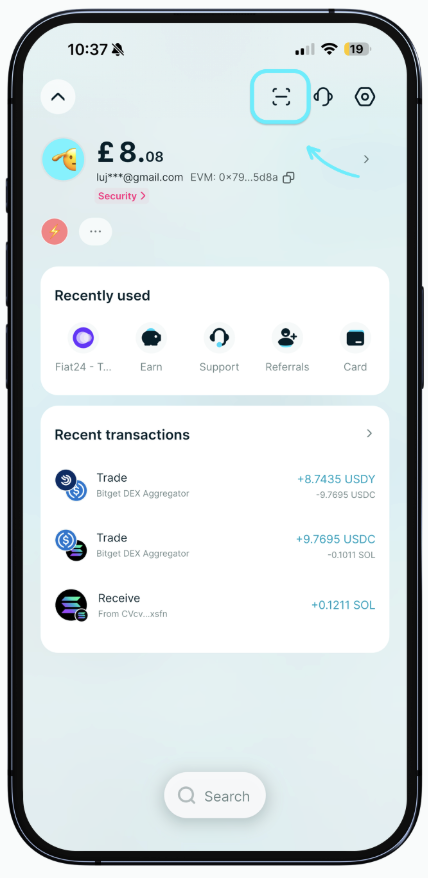
Step 1: Open the scan feature
- Go to Home: open Bitget Wallet and enter the main home screen.
- Tap the Scan icon: select the scan function to access QR payment tools.
- Choose the supported national QR payment flow: this is where the Thai QR payment flow begins in Thailand.
This step opens the payment interface used to scan supported Thai QR codes directly inside the app.
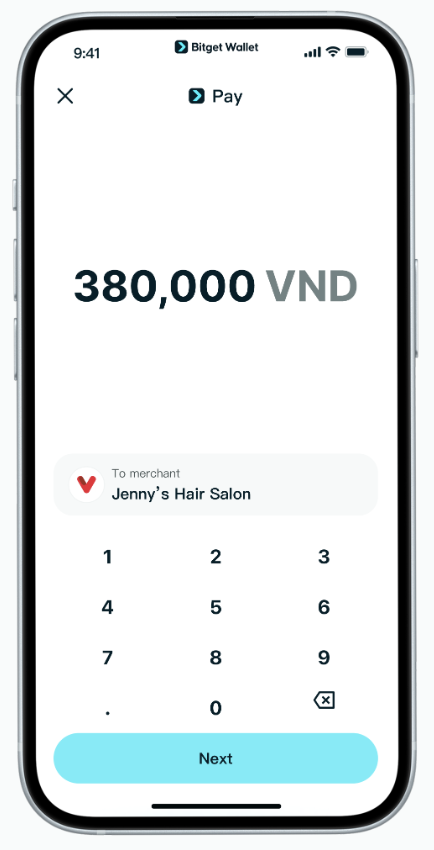
Step 2: Prepare your wallet balance
Deposit USDT or USDC into your wallet before paying so the transaction can be completed without interruption.
- Base: fund your wallet with supported stablecoins on the Base network.
- BNB Chain: deposit USDT or USDC on BNB Chain if that is your preferred payment network.
- Ethereum: make sure your Ethereum-based stablecoin balance is available.
- Solana: prepare supported stablecoins on Solana for lower-friction payments.
- Tron: deposit USDT or USDC on Tron if you plan to use that network.
Your funds will be deducted from your stablecoin balance, and settlement is handled through Bitget Wallet’s supported payment flow.
Step 3: Add native coins for gas fees
You also need native coins to cover network gas fees because QR payment Thailand with Bitget Wallet uses blockchain-based assets in the payment process. For example, if you spend USDT on BNB Chain, you need some BNB in the same wallet to pay the gas fee. If you use USDT on Ethereum, you need ETH for gas. If you use Solana-based assets, you need SOL.
BNB Chain and Solana usually offer lower fees, so they may be more practical for smaller and more frequent payments. Ethereum and Tron can be relatively more expensive depending on network conditions.
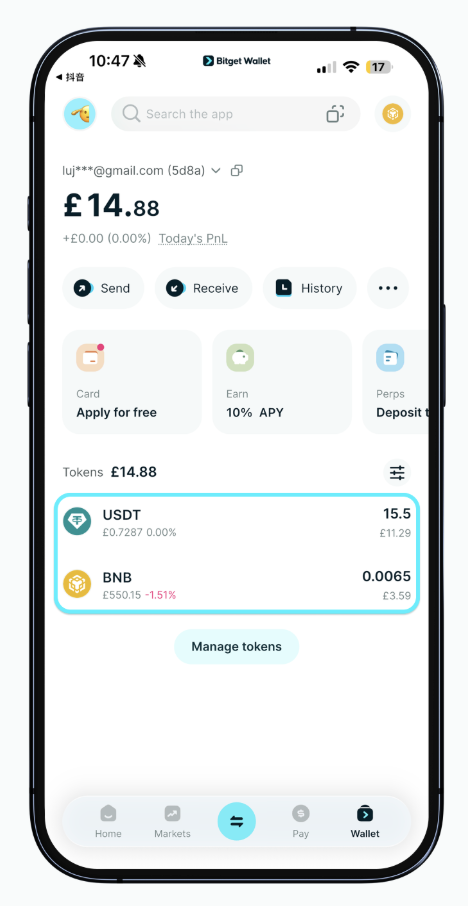
Step 4: Scan the Thai QR code and review payment details
- Scan the merchant’s Thai QR code: point your Bitget Wallet scanner at the Thai QR code shown by the merchant.
- Verify the amount: check that the payment amount is correct before continuing.
- Check the token used: confirm which stablecoin and network are selected for the payment.
The system may auto-select the token with the highest available balance, but users can switch tokens if needed and should still review the payment details carefully before confirming.
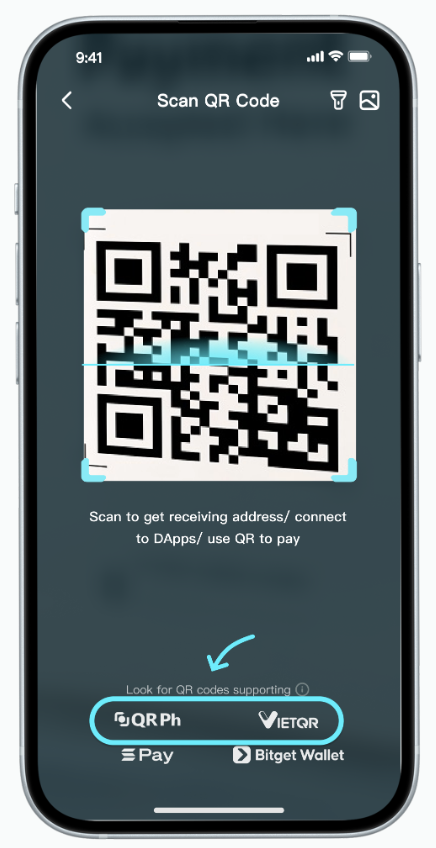
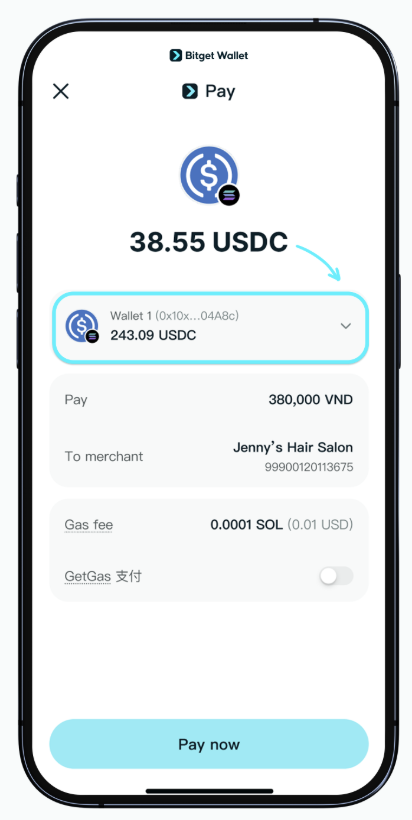
Step 5: Confirm and complete the payment
- Amount: review the payment amount shown on the confirmation page.
- Token: verify that the correct token is selected.
- Gas fee: check the network fee before proceeding.
- Check transaction limits: make sure your payment is within the supported limits:
- 500 USD per transaction
- 5,000 USD daily limit
- No monthly limit
- Tap Confirm: approve the transaction to complete the payment.
After confirmation, Bitget Wallet processes the payment so the merchant receives local fiat currency, while the user pays with supported stablecoins such as USDT/USDC. In most cases, payment confirmation is returned quickly and the recipient usually receives funds within seconds.
Step 6: Check your payment history
Go to Pay → History to track past payments and verify whether your QR payment Thailand transaction was completed successfully.
This helps users confirm payment status, review recent activity, and keep a record of their Thai QR transactions inside Bitget Wallet.
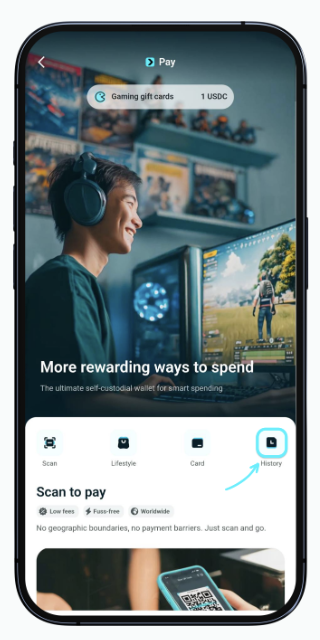
These steps make QR payment Thailand as easy as using a local PromptPay-style app, while letting users spend digital assets directly from Bitget Wallet.
What to do Before Using QR Payment Thailand?
Before you use QR payment Thailand, understanding How to Use QR Payment Thailand correctly means checking key factors like supported tokens, networks, gas fees, transaction limits, and payment confirmation. These help reduce errors and make QR payments smoother when using Bitget Wallet.
- Supported assets and networks: USDT and USDC are supported, with payment available on Base, BNB Chain, Ethereum, Solana, and Tron. Ensure your wallet is funded on a supported network before paying.
- Gas fee considerations: QR payments are on-chain transactions, so you must have enough native tokens to cover gas fees before confirming.
- Lower-fee networks: BNB Chain and Solana are often more cost-efficient for everyday payments compared with higher-fee networks like Ethereum and Tron.
- Payment confirmation: Always verify the amount, merchant, and token before confirming. The system may auto-select a token based on your balance.
- Payment speed: Most QR payments complete quickly. If delayed, check transaction history or contact support.
- Transaction limits for Thailand: Thailand falls under the supported limit structure of 500 USD per transaction, 5,000 USD daily, and no monthly limit based on the product information provided.
- Refund reminder: If the transaction fails because of merchant issues or QR errors, deducted funds are generally refunded within 24 hours.
- Practical reminder: Always double-check the QR code, amount, token, network, gas fee, and available balance before confirming any payment.
Bitget Wallet: The Best Place to Use QR Payment Thailand
How to Use QR Payment Thailand becomes seamless with Bitget Wallet, combining self-custody, stablecoin utility, and direct Thai QR scanning in one smooth flow. In a country where Thai QR Payment and PromptPay are already part of daily payment behavior, Bitget Wallet turns USDT and USDC into a more practical spending tool by letting users scan, pay, and complete transactions with automatic conversion into local currency at checkout.
How does Bitget Wallet make QR payments more practical for everyday use?
As QR payments are already familiar in Thailand through Thai QR and PromptPay, the key is making crypto spending feel just as smooth. Bitget Wallet enables a scan-and-pay experience close to local apps while allowing users to spend supported digital assets from a self-custody wallet.
- Thai QR support: Users can scan supported Thai QR codes directly in the app, matching local payment behavior.
- Stablecoin utility: Users can pay with USDT or USDC across Base, BNB Chain, Ethereum, Solana, and Tron.
- Local settlement experience: Payments are completed using crypto while the checkout experience reflects local-currency settlement in THB.
- All-in-one wallet flow: Payment, storage, and token management are integrated in one place.
- Cross-chain flexibility: Users can choose assets from multiple networks before making a payment.
- Familiar UX: The scan-and-pay flow fits naturally with Thailand’s established QR payment habits.
- Cross-border relevance: Bank of Thailand has expanded cross-border QR payment linkages with multiple jurisdictions, reinforcing how practical Thailand’s QR ecosystem has become for real-world retail payments and tourism-linked use cases.
Manage stablecoins and explore real-world QR payment Thailand more easily with Bitget Wallet!
Read more:
- How to Use QR payment Vietnam?
- How to Use QR Payment Brazil?
- How to Use QR Payment Laos?
- How to Use QR Payment Mongolia?
- How to Use QR Payment Cambodia?
- How to Use QR Payment Thailand?
Conclusion
How to Use QR Payment Thailand with Bitget Wallet is a simple process once your wallet is ready. You need supported stablecoins like USDT or USDC, a small amount of native crypto for gas fees, and a supported Thai QR payment flow. After that, the experience is straightforward: open the scan feature, scan the Thai QR code, review the payment details, confirm the transaction, and complete the payment. That makes digital assets more useful for real spending instead of leaving them as passive balances in a wallet.
Thailand is already one of the strongest QR payment markets because Thai QR Payment and PromptPay made scan-and-pay a normal part of daily transactions, and Bank of Thailand continues to build on that foundation through payment connectivity and QR-linked infrastructure. Bitget Wallet builds on that behavior by letting users connect stablecoins with familiar payment habits through direct Thai QR support in the app.
Go ahead and download Bitget Wallet to explore a simpler way to use digital assets for everyday QR payment Thailand!
Sign up Bitget Wallet now - grab your $2 bonus!
FAQs
1. How to Use QR Payment Thailand with Bitget Wallet?
Open the scan feature, fund your wallet with USDT or USDC, keep enough native crypto for gas fees, scan the Thai QR code, review the payment details, and confirm the transaction.
2. Can I use USDT or USDC for QR payment Thailand?
Yes. Bitget Wallet supports QR payments using USDT and USDC on Base, BNB Chain, Ethereum, Solana, and Tron.
3. Do I need gas fees to use QR payment Thailand?
Yes. QR payment Thailand through Bitget Wallet still requires small gas fees because the payment is processed as an on-chain transaction.
4. Are QR payment Thailand mainly based on Thai QR and PromptPay?
Yes. In Thailand, QR payment behavior is closely tied to Thai QR Payment and the broader PromptPay ecosystem described by Bank of Thailand.
5. Does Bitget Wallet support Thai QR payment Thailand?
Yes. Bitget Wallet supports Thai QR scanning directly in the app through its National QR / Scan to Pay feature.
Risk Disclosure
Please be aware that cryptocurrency trading involves high market risk. Bitget Wallet is not responsible for any trading losses incurred. Always perform your own research and trade responsibly.
- How to Use QR Payment Cambodia with Bitget Wallet?2026-04-13 | 5 mins



