


How to Buy USDT with a Credit Card: A Step-by-Step Beginner’s Guide
2025-08-15
Buying USDT, also known as Tether, with a credit card is a convenient way to add stablecoins directly to your crypto wallet without first transferring money from a bank account.
Bitget Wallet brings fiat payment options into its built-in “Buy crypto” flow, allowing you to buy USDT directly from your wallet. As a self-custodial wallet, Bitget Wallet lets you hold and manage your USDT directly rather than through third-party custody.
Depending on your region, you may see Visa, Mastercard, debit cards, bank transfers, Apple Pay, or other payment options in the “Buy crypto” flow. The available payment methods and providers are shown before you confirm the purchase.
Key takeaways
-
Buy USDT directly in Bitget Wallet using a supported credit card or another available payment method.
-
Bitget Wallet supports USDT across 19 blockchain networks, including BNB Chain, Ethereum, Solana, Morph, Tron, Base, and more.
-
Credit card purchases require identity verification, while available payment methods, providers, and fees vary by region.
-
After buying USDT, you can hold, swap, send, spend, or use eligible stablecoins with Bitget Wallet’s other features.
Buying USDT with a Credit Card
A credit card lets you purchase USDT through a fiat on-ramp without sending funds to a separate exchange first. The exact payment methods and providers available to you depend on your region.
Bitget Wallet displays the available options in the “Buy crypto” flow, so you can review the payment method, quoted amount, fees, and USDT you will receive before completing the purchase.
How to Buy USDT with a Credit Card on Bitget Wallet
You can complete the purchase in three steps.
1. Choose USDT and enter your purchase amount
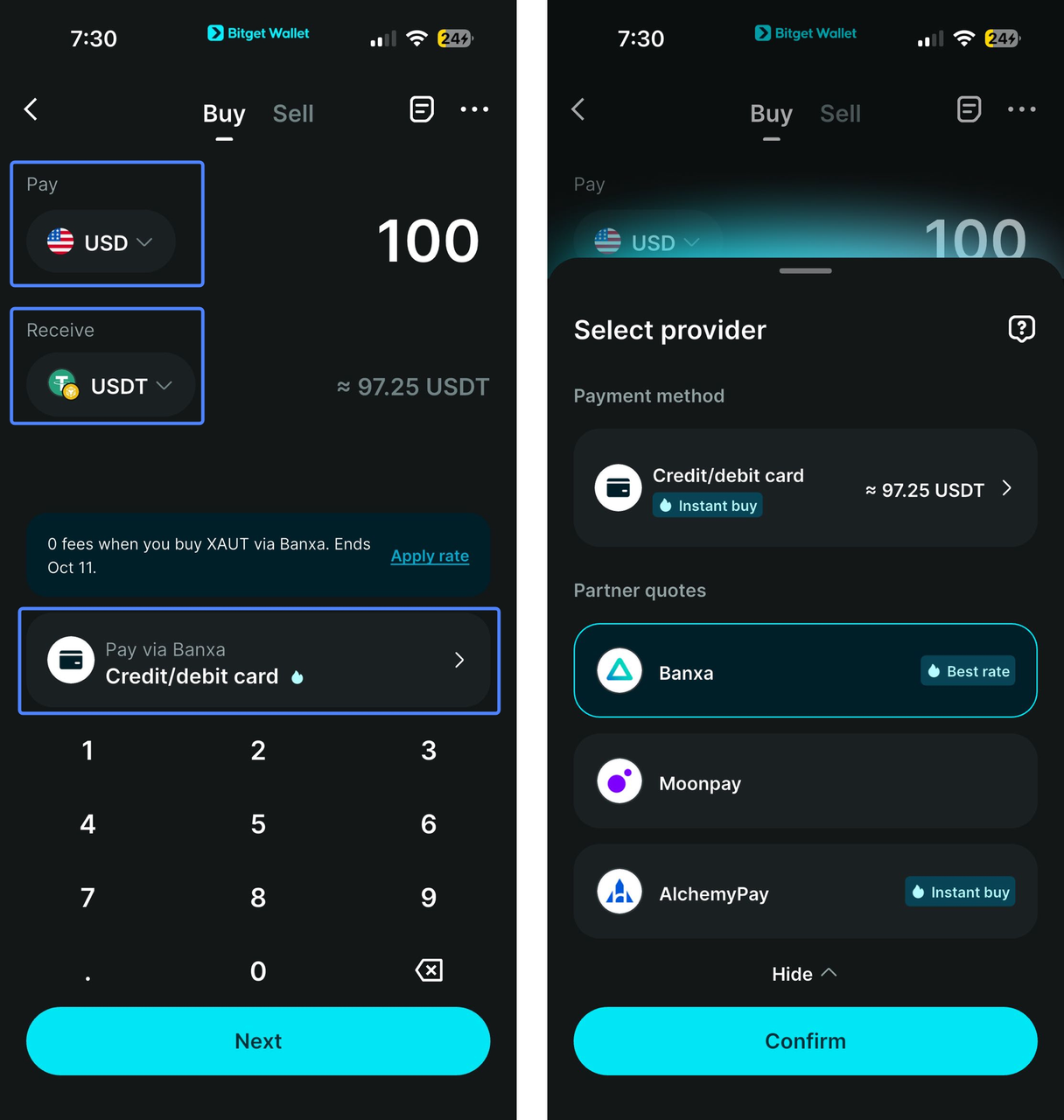
Open Bitget Wallet, tap “Add funds” from Home, and select “Buy crypto.”
Choose USDT, select the fiat currency you want to pay with, and enter the amount you want to spend.
2. Choose a payment method and review the purchase
Select an available credit card or another payment method. Depending on your region, you may also see debit cards, bank transfers, Apple Pay, or other local payment options.
If multiple providers are available, Bitget Wallet will automatically choose and show the best available price for you.
Before continuing, review the quoted amount, fees, payment method, and amount of USDT you will receive.
You can receive USDT across 19 supported blockchain networks (
mainnets), including BNB Chain, Ethereum, Solana, Morph, Tron (TRC20), Base, and more. Check the selected network carefully, especially if you plan to send the USDT to another wallet or platform.
3. Complete verification and payment
Credit card purchases require identity verification. Follow the payment provider’s instructions and verify your identity with a valid passport or ID card.
Complete the payment and wait for the USDT to arrive in your Bitget Wallet. USDT usually arrives within a few minutes after the payment is completed. If it has not appeared after 15 minutes, contact Bitget Wallet Customer Support.
Fees, Verification, and Payment Issues
What fees apply when buying USDT with a credit card?
The total amount you pay can include the cost of USDT and fees charged by the payment provider. The final quote can also vary based on factors such as liquidity, payment method, region, taxes, and the time of purchase.
Your card issuer may also apply additional fees or handle crypto purchases differently from standard card transactions.
The amount shown at the final confirmation step is the best reference for what you will pay and how much USDT you will receive.
Why did my credit card payment fail?
A failed card payment does not necessarily mean there is a problem with your Bitget Wallet account. The transaction can be declined by your card issuer or payment provider.
Common reasons include:
-
Your card issuer declined the transaction.
-
Your card or region is not supported.
-
The payment provider requires additional verification.
-
Your verification information does not meet the provider’s requirements.
-
The provider is temporarily unavailable.
-
The payment quote expired before you completed the transaction.
-
Your card has reached a transaction or spending limit.
-
Your bank has restricted the payment.
Start by checking the error message and payment details. If Bitget Wallet shows another payment provider for your purchase, you can also try that option.
Avoid using a VPN to change your apparent region. Payment providers use regional information to determine which services and payment methods are available, and changing your location can interfere with the purchase.
Do I need to complete KYC to buy USDT with a credit card?
Buying USDT with a credit card requires identity verification. You’ll need to verify your identity with a valid passport or ID card before the purchase can be completed.
This verification helps keep card purchases secure, prevent fraud, and meet applicable anti-money laundering and compliance requirements.
During the “Buy crypto” process, follow the verification instructions and provide the required identification documents to continue with your purchase.
What to Check Before Buying USDT
Before confirming your purchase, review a few details to make sure the payment and the USDT you receive match what you need.
USDT network
USDT is available across multiple blockchain networks, giving you more flexibility when choosing where to receive and use your USDT.
Bitget Wallet supports USDT across 19 networks (mainnets), including BNB Chain, Ethereum, Solana, Morph, Tron, and Base.
If you plan to send USDT to another wallet or platform, make sure it supports the same network. For example, if you buy USDT on Tron (TRC20), the receiving wallet or platform must support USDT on Tron.
Final payment amount
Review the final quote, including any applicable fees, and check how much USDT you will receive.
The quote shown at the confirmation stage reflects the transaction details available at that time.
Payment provider
If multiple providers are available, review the options shown in Bitget Wallet. Pricing, fees, payment methods, and availability can differ between providers.
Card details
Make sure your card is supported for the transaction and that your billing information matches the details requested by the payment provider.
Verification
Have your passport or ID card ready for the identity verification required during the purchase process. Follow the instructions shown in the payment flow to complete verification.
What Can You Do With USDT After Buying It?
Buying USDT is only the first step. Once it arrives in Bitget Wallet, you can hold it, swap it, send it across supported networks, spend it through the Bitget Wallet Card, or use eligible stablecoins with Earn.
Spend USDT with Bitget Wallet Card
You can top up your
Bitget Wallet Card with USDT and use the card at merchants that accept Visa or Mastercard. The card also supports payment services such as Apple Pay and Google Pay, depending on regional availability.
This lets you use crypto for everyday expenses such as shopping, dining, transport, and travel without first moving your USDT to a separate platform.
The Bitget Wallet Card also offers
Assetback rewards, with eligible cardholders able to earn up to 3% back in selected assets. Check the current card terms and availability for your region before applying.
Swap or trade your USDT
If you want to exchange your USDT for another supported asset, you can use
Bitget Wallet’s trading and swap features directly from the wallet.
This can be useful when you want to move from a stablecoin into another crypto asset without transferring your funds to a separate platform.
Send USDT across supported networks
You can send USDT to another wallet or supported platform when needed.
Before sending, check the network carefully. The sending and receiving sides need to support the same blockchain network. This is particularly important when sending USDT on networks such as Tron (TRC20).
Use eligible stablecoins with Earn
If you want to earn yield on eligible stablecoins,
Bitget Wallet’s Stablecoin Earn currently supports USDC. Stablecoin Earn Plus provides access to yield opportunities with flexible withdrawals, although rates and availability can change.
If you hold USDT, you can first swap it for a supported stablecoin such as USDC, then check the available Earn options in Bitget Wallet.
Yield products involve risks, including smart contract and market-related risks. Review the current product terms and rates before depositing funds.
Keep your USDT in a self-custodial wallet
Bitget Wallet is a self-custodial wallet, which means you retain control of your wallet and digital assets.
Self-custody does not mean there are no security measures around the wallet. Bitget Wallet also has a
$300 million Protection Fund designed to strengthen risk mitigation and provide asset and transaction protection. The fund is intended to support users in cases of asset losses caused by issues originating from the Bitget Wallet platform itself.
FAQs
Can I buy USDT with a credit card?
You can buy USDT with a supported credit card through Bitget Wallet’s “Buy crypto” feature. The available cards, payment providers, and payment options vary by region.
How do I buy USDT with a credit card?
Open Bitget Wallet, tap “Add funds” > “Buy crypto,” choose USDT, enter your fiat currency and purchase amount, then select an available payment method and complete the payment.
Can I buy USDT with a debit card?
You can use a debit card if debit card payments are supported by a payment provider available in your region. The available options are shown during the “Buy crypto” process.
Can I buy USDT with a credit card without verification?
Credit card purchases require identity verification. You’ll need to verify your identity with a valid passport or ID card before the purchase can be completed.
Can I buy USDT on TRC20 with a credit card?
If USDT on Tron (TRC20) is available for your purchase, you can select the network during the “Buy crypto” process. Before sending the USDT elsewhere, make sure the receiving wallet or platform supports USDT on TRC20.
Risk Disclosure: Cryptocurrency trading involves high market risk. Bitget Wallet is not responsible for any trading losses incurred. Always do your own research and trade responsibly.
Table of contents
Recommended
 How to Apply for a Crypto Mastercard2026-01-05 | 5 mins
 How to Apply for a Crypto Visa Card and Start Spending Crypto Worldwide2026-01-02 | 5 mins
- How to Top Up Your Crypto Debit Card with USDT2025-12-29 | 5mins



